

What Is an AI Presentation Maker?
An AI presentation maker is a tool that uses artificial intelligence to help users create slide decks faster. Instead of starting with a blank PowerPoint file, you can enter a topic, paste notes, upload documents, or describe your goal. The tool then creates a draft presentation with slide titles, content, layouts, and visuals.
Some AI presentation makers focus on design. Some focus on templates. Some focus on web-style storytelling. Some work inside Google Slides or PowerPoint. Others focus more on business-ready presentation workflows.
The best AI presentation maker depends on your use case. If you need a weekly report, monthly report, client deck, business review, pitch deck, or team update, you should choose a tool that creates clear and structured slides—not just good-looking designs.
1. Dokie AI
Best for business-ready PowerPoint presentations
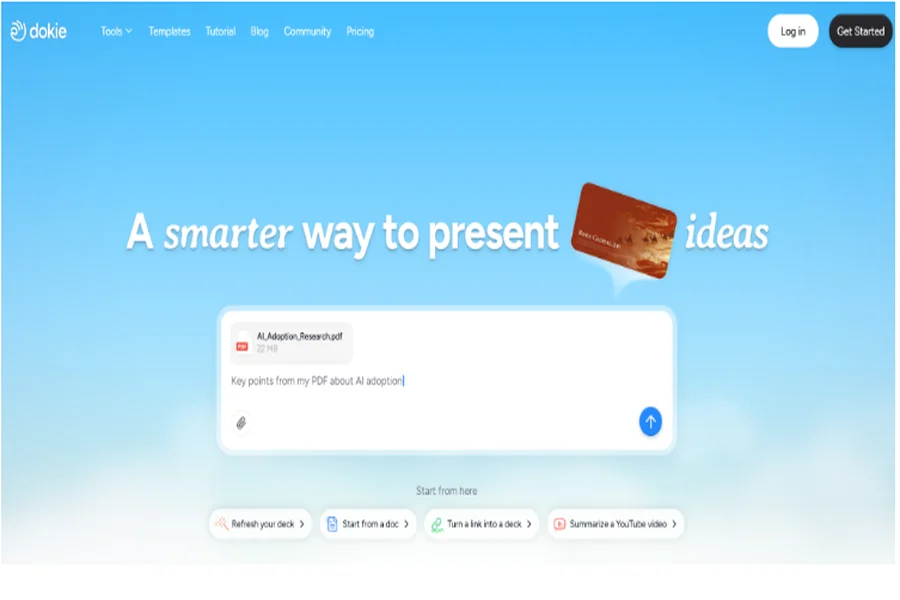
Dokie AI is one of the best AI presentation makers for users who need practical, structured, and ready-to-use slides. It is built for real office scenarios, such as weekly reports, monthly reports, client decks, business reviews, pitch decks, team updates, and marketing presentations.
Unlike tools that only focus on visual design, Dokie AI helps users create a clearer presentation structure. This matters because business slides need logic, not just decoration. A useful deck should guide the audience from background to insight, and then to the next action.
Dokie AI is also strong for traditional PPT workflows. Many teams still need PowerPoint files they can export, edit, share, and present in meetings. Dokie AI fits this need better than tools that feel more like web pages, design boards, or template libraries.
It also offers many free PPT tools, including PDF to PPT, Word to PPT, Text to PPT, Excel to PPT, JPG to PPT, PNG to PPT, HTML to PPT, and Doc to PPT. These tools are useful when your source content is not already in slide format.
Pros
Dokie AI creates clean, structured, business-friendly slides. It is useful for office users who need fast presentation delivery. It supports traditional PPT workflows and offers many free PPT conversion tools.
Cons
Dokie AI is still a newer platform. Users who want a very broad design ecosystem may still use Canva or other design-first tools together with it.
2. Gamma
Best for web-style presentations and quick storytelling
Gamma is a popular AI presentation maker for creating modern decks, documents, and web-style presentations. It is good for turning an idea into a polished visual story quickly.
Gamma works well for async sharing, product explainers, startup ideas, knowledge documents, and lightweight pitch materials. Its output often feels clean, modern, and easy to read. If you want to share a link instead of sending a PowerPoint file, Gamma can be a strong choice.
The main advantage of Gamma is speed. You can enter a prompt and get a presentation draft quickly. It also feels more flexible than a traditional slide editor because the content can look like a web page or visual document.
However, Gamma may not be the best fit for every office workflow. Some users may feel that Gamma presentations are closer to web documents than traditional business decks. If your team needs a standard PPT for formal meetings, client reviews, or internal reporting, you may need to adjust the structure and format.
Pros
Gamma is fast, modern, and easy to use. It is strong for web-style storytelling, async sharing, and visual documents.
Cons
Gamma may feel less traditional for users who need formal PowerPoint-style business decks.
3. Canva AI Presentation Maker
Best for visual design and creative slides
Canva AI Presentation Maker is a strong option for users who care about visual design. Canva has a large template library, simple editing tools, brand kits, graphics, icons, images, and many other creative assets.
It is a good choice for marketers, students, teachers, content creators, and small businesses. If you need a good-looking deck for education, social media, events, simple marketing, or brand content, Canva can help you create it quickly.
Canva’s biggest advantage is its design ecosystem. You can create a presentation and then reuse the same visual style for social posts, documents, posters, videos, and other marketing assets. This is useful for teams that want consistent branding across channels.
However, Canva may not always be the fastest option for business-ready slides. It is strong at making slides look good, but users may still need to improve the structure, rewrite business content, and make the deck more suitable for meetings.
Pros
Canva is easy to use and very strong for visual design. It has many templates and creative assets.
Cons
Canva may require extra editing if you need a structured, formal business presentation.
4. Beautiful.ai
Best for smart slide formatting
Beautiful.ai is an AI presentation tool focused on smart design and slide formatting. It helps users create slides that automatically adjust as content changes. This can save time when building clean and consistent presentations.
Beautiful.ai is useful for teams that want polished slides without spending too much time on manual formatting. Its smart templates help keep spacing, alignment, and layout consistent across the deck.
This makes Beautiful.ai a good fit for sales decks, marketing decks, startup presentations, and business overviews. It can also help teams maintain brand consistency across different presentations.
However, Beautiful.ai may feel less flexible for users who want full control over every slide detail. Smart templates are helpful, but they can also limit creative freedom. If your presentation needs a very specific layout or storytelling flow, you may need more manual editing.
Pros
Beautiful.ai helps users create clean, consistent, and well-formatted slides. Its smart templates reduce design work.
Cons
Beautiful.ai can feel restrictive if you want full slide customization or a very specific deck structure.
5. Slidesgo
Best for presentation templates
Slidesgo is best known for its large collection of Google Slides themes and PowerPoint templates. It is a useful choice if you already know your content and mainly need better visual design.
Slidesgo is especially popular for education, classroom presentations, school projects, creative decks, and topic-based slides. Teachers and students can find many ready-made templates that are more colorful and engaging than basic presentation themes.
Slidesgo also offers AI presentation features, which can help users create slides faster. But its main strength is still templates. It is a good resource when you need inspiration, layouts, and visual direction.
For business users, Slidesgo may not always be enough by itself. A good business presentation needs more than a nice template. It needs a clear structure, strong message, and useful slide flow. Users may still need to write and organize the content manually.
Pros
Slidesgo has many attractive templates for PowerPoint and Google Slides. It is especially useful for education and creative presentations.
Cons
Slidesgo is more template-focused than workflow-focused. It may require extra work for business-ready decks.
6. Plus AI
Best for Google Slides users
Plus AI is a good option for users who want to create and edit presentations directly in Google Slides. Instead of moving to a separate presentation platform, users can use AI inside their existing Google Slides workflow.
This makes Plus AI useful for teams that already collaborate in Google Workspace. You can generate a presentation, rewrite slide content, remix slides, and update existing decks without leaving Google Slides.
Plus AI is especially helpful when you want AI assistance inside a familiar editor. It can support sales decks, internal updates, strategy decks, and business presentations. For teams that use Google Slides daily, this can reduce workflow friction.
However, Plus AI may not be the best option if you want a standalone AI presentation maker with a broader visual design ecosystem. It is more useful as an AI assistant inside Google Slides than as a full design-first platform.
Pros
Plus AI works well inside Google Slides. It is useful for teams that already use Google Workspace.
Cons
Plus AI may feel less complete if you want a standalone presentation platform with many built-in templates and visual assets.
7. Presentations.ai
Best for quick AI-generated business drafts
Presentations.ai is an AI presentation maker that helps users create professional-looking decks from prompts. It is designed to make presentation creation faster, especially for users who want to turn ideas into structured slide drafts.
It can be useful for startup decks, business overviews, sales presentations, marketing plans, and team updates. The tool focuses on generating slides quickly and giving users a starting point that can be refined.
Presentations.ai is a good option if you want a fast AI-first presentation workflow. Instead of choosing a template first, you can begin with your topic and let the AI create the initial deck.
However, like many AI presentation tools, the final output may still need editing. Users may need to adjust slide titles, refine the message, improve data points, and make the deck match their exact business context.
Pros
Presentations.ai is fast and useful for creating AI-generated business presentation drafts.
Cons
The output may still need manual editing before it is ready for a serious meeting or client presentation.
8. Tome
Best for visual storytelling and narrative decks
Tome is an AI-powered storytelling tool that helps users create visual narratives, pitch-style pages, and presentation-like content. It is useful for users who want something more modern than a traditional slide deck.
Tome works well for product stories, startup pitches, creative portfolios, thought leadership, and visual explainers. Its strength is narrative flow. It can help users turn an idea into a clean and engaging story.
Tome can be a good option when the goal is not a standard PowerPoint deck. If you want to present an idea in a more interactive or web-style format, Tome may feel more natural than classic slide tools.
However, Tome may not be ideal for users who need traditional PPT output for business meetings. If your team expects a PowerPoint file, standard slide structure, and easy offline editing, Tome may require extra work or may not fit the workflow.
Pros
Tome is strong for visual storytelling, narrative presentations, and modern pitch-style content.
Cons
Tome may not be the best fit for traditional PowerPoint workflows or formal business reporting.
How to Choose the Best AI Presentation Maker
The best AI presentation maker depends on your main goal.
If you need business-ready decks for meetings, reports, and client presentations, choose Dokie AI. If you want web-style storytelling, Gamma and Tome are good options. If design is your top priority, Canva is strong. If you want smart formatting, Beautiful.ai is useful. If you mainly need templates, Slidesgo is worth trying. If your team works in Google Slides, Plus AI can be convenient. If you want quick AI-generated drafts, Presentations.ai is another option.
Before choosing a tool, ask yourself one question: do you need a beautiful draft, or do you need a presentation that is ready for real work?
For most business users, structure matters more than decoration. A deck should help your audience understand the topic quickly and take action. That is why a business-focused AI presentation maker can often save more time than a design-only tool.
Conclusion
AI presentation makers can help you create slides faster, but each tool has a different strength. Canva and Slidesgo are great for visual design and templates. Gamma and Tome are strong for web-style storytelling. Beautiful.ai helps with smart formatting. Plus AI works well inside Google Slides. Presentations.ai is useful for fast drafts. But if you need structured, business-ready PowerPoint slides for real office work, Dokie AI is the best AI presentation maker to try first.
